FLYER Notebook — the Chrome extension
A student reads an English article anywhere on the web, double-clicks a word, and the word — with its IPA, meaning and the sentence it sat in — goes into the mistake notebook on ieltsguru.ai. Words the student gets wrong inside the product come back the other way.
Xuất xứ / Prompt / Giới hạn
Prompt (26/10/2026): “Build cho anh một Chrome Extension đặt tên là FLYER Notebook nhé. Hoặc em đề xuất tên nào nữa không? Exension này sẽ đồng bộ với vocabulary notebook mà học sinh đang mắc lỗi trên ieltsguru.ai — https://roadmap.flyer.vn/ielts/classic-v2/#/extension”
Written by an AI assistant in one session. The extension itself is real, installed and tested in Chrome; this page describes what was built and how to install it.
Sources: the prototype screen /ielts/classic-v2/#/extension for the intended behaviour; word lookups come from the public dictionary service api.dictionaryapi.dev; the word tag uses sublist 1 of Coxhead's Academic Word List.
Limits:
- The ieltsguru.ai source repository could not be read during this session (macOS blocked the folder), so the notebook schema on the product side was not inspected. The sync layer therefore targets a documented contract that the product can implement, not a confirmed internal API.
- Until that API exists, the default endpoint is a demo service on roadmap.flyer.vn keyed by a random device key — it holds only vocabulary, no login and no personal data.
- The per-word IELTS band comes from the product when the API returns one. Until then a word only carries an “Academic Word List” tag, not an invented band.
- Installation is Developer mode → Load unpacked; publishing to the Chrome Web Store needs a developer account and a review.
1 · What the student gets
| Moment | What happens |
|---|---|
| Reading an article | Words already in the notebook are underlined, so a word met a second time is visible |
| Double-click a word or Alt+S, or right-click → Save | A card gives IPA, part of speech, meaning, up to two synonyms, the sentence it came from, and an Academic Word List tag where it applies |
| Pick a list and save | The word is written locally first, then pushed to the notebook — a failed sync never loses a word |
| Open the toolbar icon | The word list, a review queue and the week's counters. The badge shows how many words are due |
| Review | Leitner, five boxes: a word known comes back in 1, 3, 7 then 16 days; a word missed returns tomorrow |
| Gets a word wrong inside ieltsguru.ai | It appears in the extension on the next sync, tagged “From my mistakes” |
2 · Install it (4 steps, 1 minute)
- Unzip the folder somewhere permanent — Chrome loads it from that path every time it starts.
- Open
chrome://extensionsand turn on Developer mode (top right). - Click Load unpacked and choose the
flyer-notebookfolder. - Pin FLYER Notebook to the toolbar. Open any English article and double-click a word.
3 · What it looks like
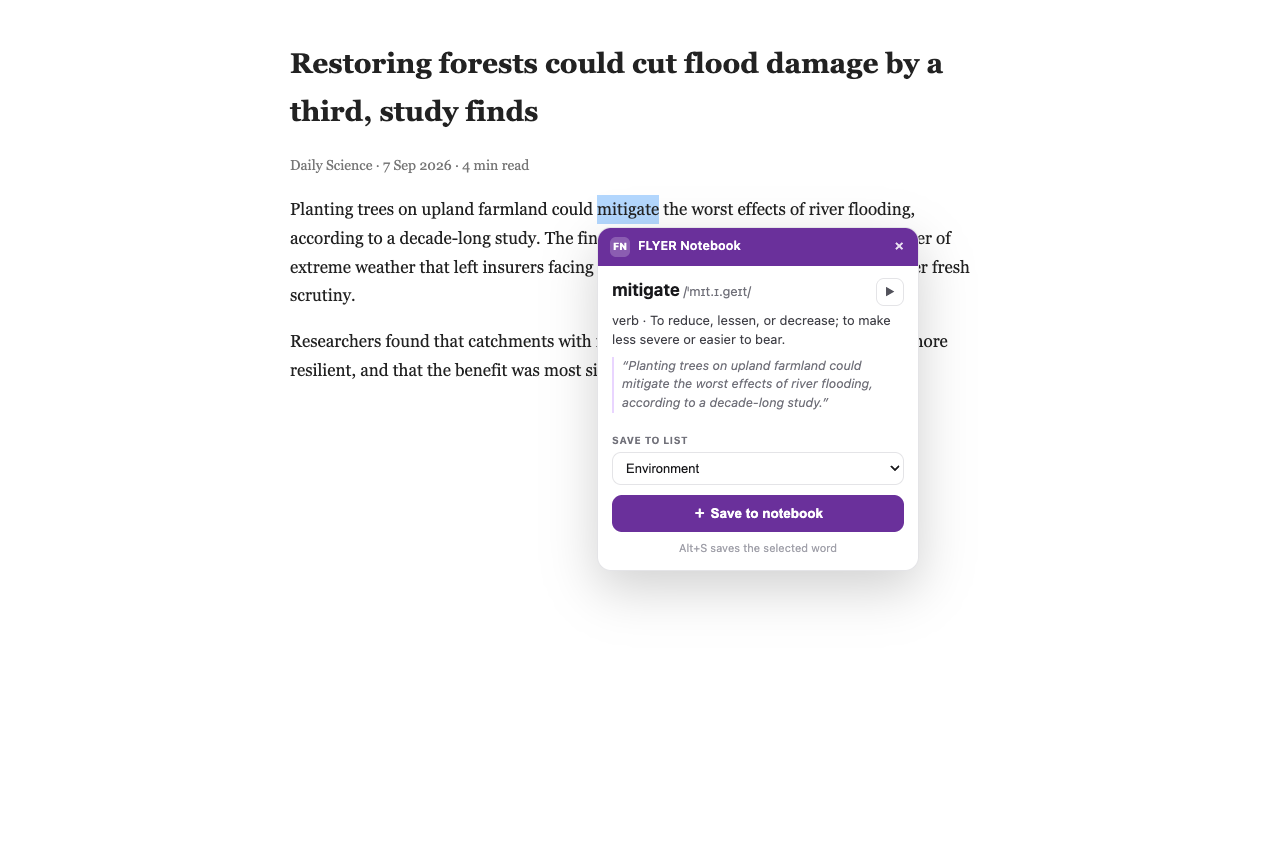
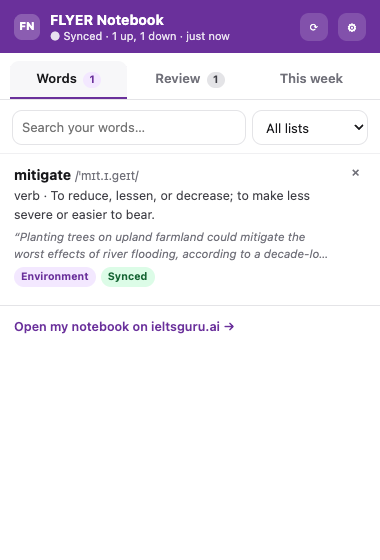
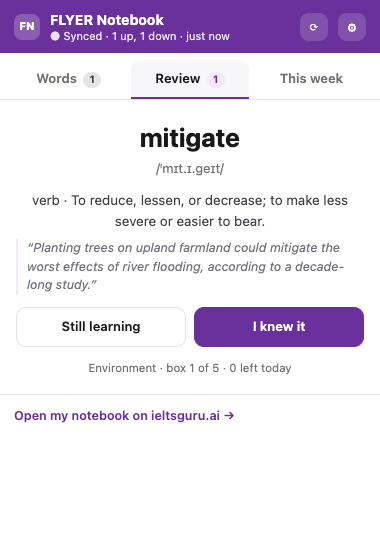
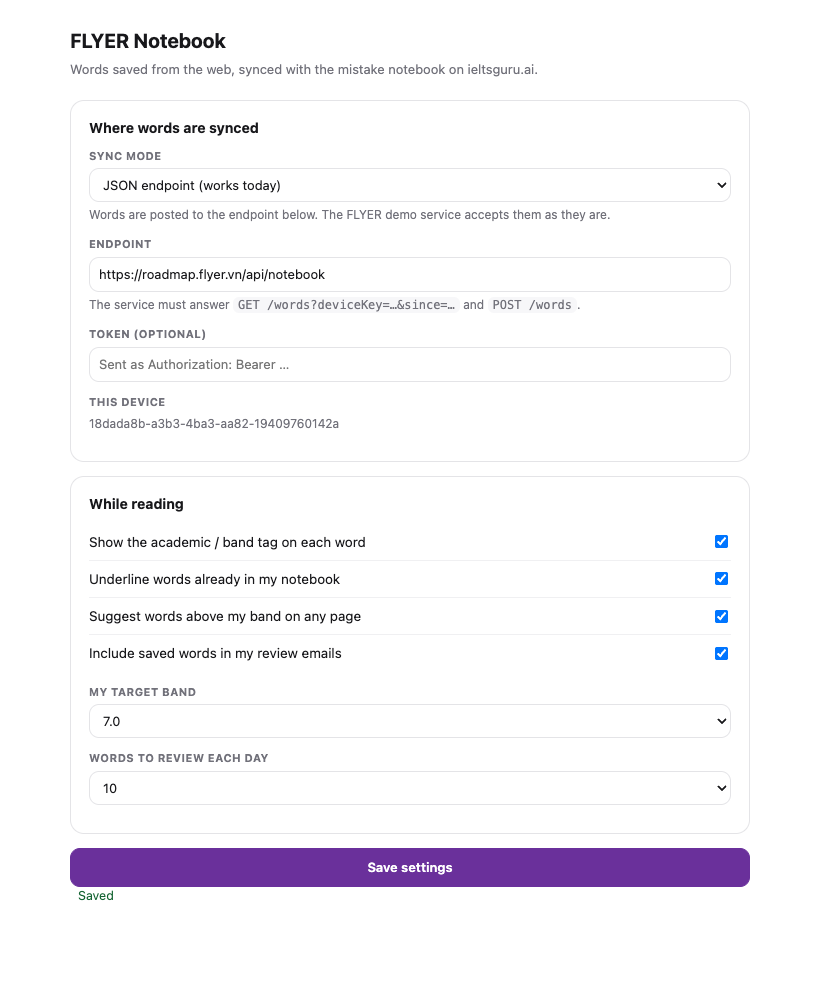
4 · How the sync works
A word is always saved on the computer first and pushed afterwards. Three modes, chosen in Settings.
| Mode | What it does | Needs |
|---|---|---|
| JSON endpoint default | Posts words to an endpoint and pulls back what changed. Points at the FLYER demo service today; point it at ieltsguru.ai and nothing else changes. | An endpoint |
| Through the ieltsguru.ai tab | The extension talks to the tab the student is already logged into, so their own session authenticates and no token lives in the extension. | ~20 lines on the product page |
| This computer only | Nothing leaves the browser. Words keep queueing and go up when sync is switched on. | Nothing |
The contract the product can implement
POST {apiBase}/words   { deviceKey, words: [ {id, word, ipa, pos, definition, sentence,
                           url, title, list, band, source, seen, box, reviews,
                           createdAt, updatedAt} ] }
      → { saved: [ {id, remoteId} ], serverTime }

GET  {apiBase}/words?deviceKey=…&since=<ms>
      → { words: [ … same shape, plus remoteId … ], serverTime }
The demo service lives in functions/api/notebook/words.js on this site, backed by the D1 table notebook_words: vocabulary only, 5 000 words per device, no account attached.
The page side of the tab bridge
window.addEventListener('message', async (e) => {
  if (e.source !== window || e.data?.source !== 'flyer-notebook-ext') return
  const { id, type, payload } = e.data
  let result = { unavailable: true }
  if (type === 'notebook.push') result = { saved: await saveWordsToNotebook(payload.words) }
  if (type === 'notebook.pull') result = { words: await getNotebookWords(payload.since) }
  window.postMessage({ source: 'flyer-notebook-page', id, payload: result }, location.origin)
})
The extension also announces itself with notebook.hello and its version, which the product's own extension screen can use to show “Connected”.
5 · What leaves the browser
- The word being looked up goes to the public dictionary service — the word alone, cached so it is asked once.
- A saved word carries its IPA, meaning, the sentence, the page URL and title, and the list name.
- Nothing else: no browsing history, no page content, no account details.
6 · The name
FLYER Notebook is the name used throughout, and it is the one worth keeping: it matches what the student already calls the feature inside the product (“mistake notebook”), so nothing new has to be explained. Three alternatives were considered — FLYER Word Catcher (the name on the prototype screen, more playful but a second vocabulary for the same thing), Guru Notebook (closer to ieltsguru.ai, weaker on the FLYER brand) and Notebook by IELTS Guru (clear in the Web Store, long on the toolbar). The prototype screen has been changed to say FLYER Notebook so the product and the extension agree.
Prototype screen: /ielts/classic-v2/#/extension · Source folder: Downloads/flyer-notebook